Most Foundry user projects involve users coming to work on-site at the Foundry for some period of time, anywhere from a few days to a year. All users working on-site at the Foundry (and some of those who work off-site) must be appointed as an LBNL Affiliate in order to receive a Berkeley Lab badge and a Berkeley Lab identity account (sometimes called an “LDAP”). Your Berkeley Lab identity credentials are used to access the online safety and training systems, instrument reservation calendars, compute clusters, and Berkeley Lab email.
Generally, most users can work onsite at Berkeley Lab. However, users who are from SST countries (Iran, North Korea, Cuba, and Syria) need DOE permission and authorization from other U.S. Government agencies to work with Berkeley Lab, a process that can take 6 months or longer to obtain, with no guarantee of approval.
Discuss Start Date and Activate Proposal
Contact your Assigned Scientist to discuss the logistics of your project and your arrival date. Once you’re ready to start your proposal, ask your Assigned Scientist to activate it for you. Your proposal will last for 1 year from the date of activation. If you aren’t sure who your Assigned Scientist is, log in to the User Portal to view your proposal.
Apply for a Berkeley Lab Badge
In order to work onsite at the Foundry, you must have an active Berkeley Lab badge and a Berkeley Lab identity account or “LDAP”.
To get a new Berkeley Lab badge and identity, you will need to be appointed as an LBNL Affiliate (unless you are an LBNL employee). It is recommended that you initiate this process 1-2 months prior to your arrival at the Foundry**. Follow the instructions below to request a new badge/affiliate appointment or to restart a terminated appointment:
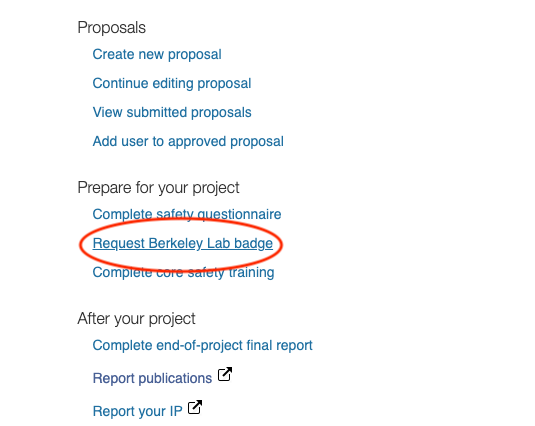
- Log in to the User Portal, follow the link to request a badge.
- Non-U.S. citizens will be subsequently contacted to provide additional documentation, including: C.V., visa documentation, green card copy (if applicable), and passport copy. NOTE: Please be on the lookout for follow-up emails after you submit your badge request, and contact foundry-useroffice@lbl.gov if you have questions during this process. Failure to provide all requested documents will delay the processing of your badge request.
Please allow 3-5 days after entering the United States for review of arrival documents before badge access to Berkeley Lab. - Users under the age of 18 will require additional documents and review prior to obtaining a badge.
- Once the review process is complete, you will receive another email from the Site Access Office containing details about picking up your badge and your Berkeley Lab identity credentials. Badge appointments take place at the Site Access Office, Building 65A.
- Complete the General Employee Radiation Training (GERT) online prior to your badge appointment.
It is also possible to get an early start on your safety training requirements online before you arrive. To view and complete the recommended core safety training courses for your project, log on to the User Portal and navigate to the section titled “Complete core safety training.”
Working at the ALS
If your proposal requested access to the Advanced Light Source (ALS), you will receive instructions for creating an ALS Hub account and scheduling beamtime (ALS Hub link) shortly after your Foundry proposal is activated.
Setup Your Lab Google Account
Berkeley Lab uses the Google Suite of tools, including gmail, calendar, and documents. Log in here with your Berkeley Lab identity credentials to access your email and the Google Suite.
You will be expected to receive and read any messages sent to your Berkeley Lab email account during your time at the Foundry. If you don’t plan to check your Berkeley Lab email on a regular basis, you must set up automatic forwarding from your Berkeley Lab account to your preferred email address.
Emergency Lab Communications
LabAlert is a communication tool that Berkeley Lab uses to provide emergency alerts to the Lab community via email, phone, and text message. Sign up for LabAlert to receive direct notifications about potential Lab closures and emergency information.

